By Bilal Akram, CFA | Lead AI & Tech Economy Analyst| Updated: January 14, 2026
The greatest hurdle for generative AI video has never been the wow factor; it has been the stability factor. Until now, keeping a character, object, or background consistent across multiple clips was a digital gamble. With the release of Google Veo 3.1, Google is moving the industry from random generation to directed production.
By enhancing the Ingredients to Video feature and introducing native 9:16 vertical support, Google Veo 3.1 isn’t just another update it’s a professional toolkit designed for the mobile first creator economy.
How to Create Consistent Videos with Google Veo 3.1
Creating high quality, stable video with Google Veo 3.1 is a three step process designed for creative control:
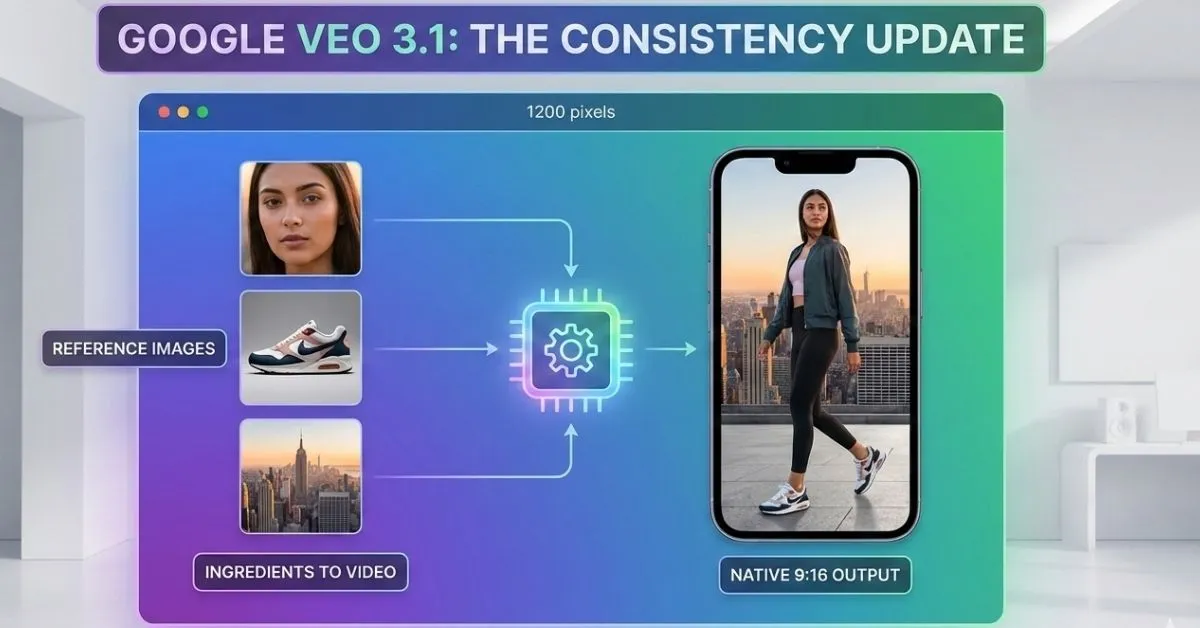
- Select Your Ingredients: Upload up to three reference images. Use one for your character’s face, one for the environment style, and one for a specific object (like a product or tool).
- Define the Format: In the settings or via prompt, specify your aspect ratio. For social media, select 9:16 (Vertical) to ensure the AI composes the shot for mobile.
- Prompt for Motion: Write a descriptive prompt focusing on the action.
- Example: A cinematic tracking shot of the character from reference image 1 walking through the snowy mountains from reference image 2.
- Upscale and Verify: Once the preview is generated, select the 4K Upscale option for professional clarity. Each video will automatically include a SynthID watermark for transparency.
1. The Ingredients to Video Revolution: Solving Identity Drift
The core of the Google Veo 3.1 update is a significant leap in character and background consistency. In earlier AI models a character’s face or clothing would morph slightly between scenes a phenomenon known as temporal drift.
The Google Veo 3.1 Ingredients to Video capability allows creators to use up to three reference images to anchor the generation:
- Character Identity: By uploading a specific character reference, the AI ensures the subject remains identical across different settings and angles.
- Environmental Stability: Textures, backgrounds, and specific objects now stay locked in place, allowing for multi scene narratives that feel like a cohesive film rather than a series of disconnected clips.
2. Native Vertical Video: No More Crop & Pray
For the first time, Google has introduced Native 9:16 Portrait Output. While previous AI generators focused on cinematic landscape (16:9), the majority of modern content is consumed on phones via YouTube Shorts, TikTok, and Instagram Reels.
Generating vertical video natively rather than cropping a horizontal frame offers two massive advantages:
- Optimized Composition: The AI understands the vertical frame, ensuring subjects are centered and movements are tailored for a portrait screen.
- Zero Quality Loss: By rendering in 9:16 from the first pixel, creators avoid the pixelation and blurring that occurs when zooming in to crop landscape video.
3. Professional Fidelity: 1080p, 4K, and the Gemini API
Google is bridging the gap between social media creators and professional filmmakers with high resolution output options.
- State of the art Upscaling: Google Veo 3.1 introduces improved 1080p and 4K video generation, utilizing advanced upscaling techniques that preserve fine textures and lighting.
- Developer Integration: Through the Gemini API and Vertex AI, developers can now build these capabilities into their own apps. This is a clear move to compete with OpenAI’s Sora, positioning Veo as the more accessible and integratable professional choice.
- Google Flow & Vids: For enterprise users, the Flow interface provides granular editing controls, including the ability to extend clips and manage scene by scene continuity.
4. Safety and Verification with SynthID
As AI video becomes indistinguishable from reality, Google is doubling down on transparency. Every clip generated by Google Veo 3.1 includes SynthID, an imperceptible digital watermark.
Furthermore, the Gemini app now includes a verification feature that allows users to upload a video to check if it was generated by Google AI. This layer of trust is essential for brands and journalists using AI tools in a professional capacity.
Availability and Pricing
Google Veo 3.1 is being rolled out across Google’s entire ecosystem:
- Consumer Apps: Available in YouTube Shorts, the YouTube Create app (initially in select regions like the US, India, and Canada), and the Gemini app.
- Professional Suites: Rolling out to Google Flow, Google Vids, and Vertex AI.
- Pricing: Access typically requires a Google AI Pro or AI Ultra subscription for high fidelity 4K output and higher generation limits.
Key Takeaways
- Total Consistency: Use Ingredients to Video to keep characters and backgrounds stable across multiple scenes.
- Mobile First Design: Native 9:16 support eliminates the need for cropping and composition guesswork for YouTube Shorts.
- Studio Quality: New 4K upscaling and 1080p improvements make AI video viable for large screen professional projects.
- Built in Verification: All videos carry SynthID watermarks, ensuring ethical and transparent content creation.
FAQ
1. What exactly is Ingredients to Video in Google Veo 3.1?
Ingredients to Video is a feature that allows you to upload up to three reference images (the ingredients) to guide the AI. Instead of relying solely on text prompts, Google Veo 3.1 uses these images to anchor the visual identity of characters, objects, or settings. This ensures that the subject doesn’t morph or change appearance between different video clips.
2. Can I use Google Veo 3.1 for free?
Currently, Google Veo 3.1 is available as part of Google’s premium AI ecosystem. While some features are being integrated into YouTube Shorts for select creators, full access to 4K upscaling and professional tools typically requires a Google AI Pro or AI Ultra subscription. Developers can also access it via the Gemini API with a pay as you go model through Vertex AI.
3. How long are the videos generated by Google Veo 3.1?
Base generations are typically 4, 6, or 8 seconds long. However, professional users can use the Scene Extension tool within Google Flow or the Gemini API to stitch and extend these clips. By using the final frame of one clip as the starting point for the next, you can build cohesive narratives that last over a minute.
4. Does Google Veo 3.1 generate native vertical video for TikTok and Shorts?
Yes. Unlike previous versions that required cropping a horizontal video, Google Veo 3.1 supports native 9:16 (portrait) generation. This means the AI composes the shot specifically for mobile screens from the start, preserving higher detail and better framing for platforms like YouTube Shorts and Instagram Reels.
5. How do I maintain character consistency across different scenes?
To keep a character looking the same, upload a clear reference image using the Ingredients to Video tool. For best results, use a high quality image of the character in the desired style. Google Veo 3.1 will then map that character’s features onto the motion and actions described in your prompt, keeping their identity stable even if the background changes.
6. How can I tell if a video was created with Google Veo 3.1?
Every video produced by Google Veo 3.1 is embedded with SynthID, an invisible digital watermark developed by Google DeepMind. You can verify a video’s origin by uploading it to the verification tool within the Gemini app, which will detect the watermark even if the video has been lightly edited or compressed.
7. What are the resolution options available in the new update?
The update introduces two professional tiers:
Improved 1080p: Optimized for standard editing and mobile playback with sharper textures.
4K Upscaling: Available for high end production workflows via Google Flow and Vertex AI, delivering cinematic clarity for large screens.

𝑻𝒉𝒆 𝑷𝒖𝒍𝒔𝒆 𝒐𝒇 𝑮𝒍𝒐𝒃𝒂𝒍 𝑨𝒇𝒇𝒂𝒊𝒓𝒔
